

How do I fix server errors or timeouts on long requests?
Fix long-request timeouts with streaming in Cherry Studio or the BetterToken API. Split large tasks, check usage before retrying, and collect support details.
Symptoms
- You send a large input, such as tens or hundreds of thousands of characters, or ask for a very long answer.
- After several minutes, you see
Server error, please try again later (openai_error),bad response status code 524, a timeout, or a closed connection. - Short requests work at the same time, but switching networks, VPNs, or connection locations does not fix long requests.
Cause
With non-streaming output, the client receives the result only after the model finishes the entire answer. A long task can exceed a client or connection timeout before that result arrives.
If short requests work but long ones repeatedly time out, check the output mode and task size first instead of repeatedly switching VPNs. The error alone does not rule out network issues or service overload.
Solutions
1. Enable streaming
Streaming returns content incrementally, reducing idle timeouts caused by a long gap without response data. A slow first chunk, the client’s total timeout, or service overload can still cause failure.
Cherry Studio
This path was verified in the English interface of Cherry Studio 2.0.14:
- Open the assistant’s chat and click its name at the top to open Edit Assistant.
- Select Model.
- Make sure Stream output is on.
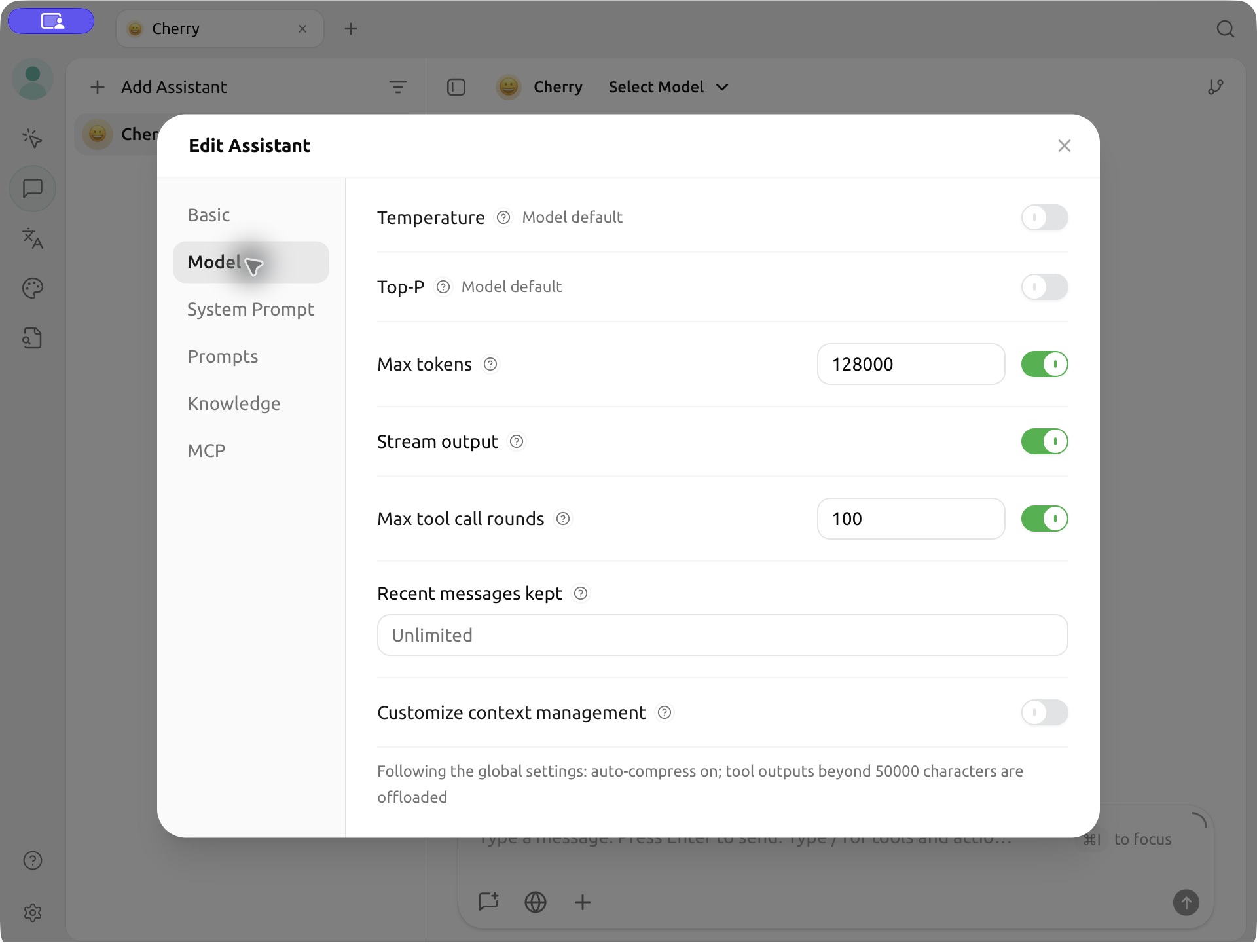
A Cherry Studio user reported that enabling streaming resolved repeated timeouts on long tasks.
Direct API calls
Set your BetterToken API Key in the BETTERTOKEN_API_KEY environment variable and replace ... with your task. Add "stream": true to the request body; --no-buffer disables curl output buffering.
curl --no-buffer https://bettertoken.ai/v1/chat/completions \ -H "Authorization: Bearer $BETTERTOKEN_API_KEY" \ -H "Content-Type: application/json" \ -d '{ "model": "claude-opus-5-5", "stream": true, "messages": [{"role": "user", "content": "..."}] }'The response arrives as SSE events, not a single complete JSON object. With an SDK, use its streaming interface to read chunks.
2. Split the task if streaming is unavailable
Process large texts in sections or ask for the result in stages. If streaming still times out, reduce the input or the length of each answer.
3. Do not repeatedly resend the same request
Do not wait for a closed connection to recover automatically. A timeout or disconnect does not prove that the server did not execute the request or that no charge occurred. Check usage records first and retain the request ID, if available, and error details before deciding to resend. A repeated submission may run and be billed again.
Peak hours
High load can slow model responses and increase timeouts. Peak hours vary by model and region; evenings and weekends are not guaranteed to be faster. Try non-urgent tasks later.
Still having trouble?
Send support:
- The approximate error time, including the time zone.
- The Model ID.
- The client name and version.
- Whether streaming was enabled and whether any answer content arrived before the error.
- The error details, request ID if available, and approximate input length.
Do not send a full API Key or sensitive input text.