> ## Documentation Index
> Fetch the complete documentation index at: https://docs.bettertoken.ai/llms.txt
> Use this file to discover all available pages before exploring further.
# TRAE 설정: 설치, API Key, Base URL 및 사용자 지정 모델
> TRAE를 설치하고 BetterToken Base URL 및 API Key를 설정한 다음 호환되는 provider model을 선택하고 일반적인 오류를 해결하세요.
TRAE를 BetterToken에 연결하려면 API Key를 준비하고 아래 Base URL을 입력한 후 모델 광장에서 현재 Model ID를 선택하세요.
## 주요 설정
| 필드 | 값 |
| -------------- | ----------------------------------------------------------------- |
| API Key | BetterToken API Key |
| 전체 request URL | `https://www.bettertoken.ai/v1/chat/completions` |
| 모델 | 모델 광장의 현재 Model ID |
## 사전 요구 사항
* 최신 버전의 도구가 설치되어 있음
* BetterToken API Key: 등록하고 발급받기
* 모델 광장의 Model ID
### 추가 요구 사항
## 설치
TRAE를 설치하거나 연 다음 아래의 수동 설정을 계속하세요.
## 수동 설정
| 필드 | 값 |
| -------------- | ----------------------------------------------------------------- |
| API Key | BetterToken API Key |
| 전체 request URL | `https://www.bettertoken.ai/v1/chat/completions` |
| 모델 | 모델 광장의 현재 Model ID |
### 설정
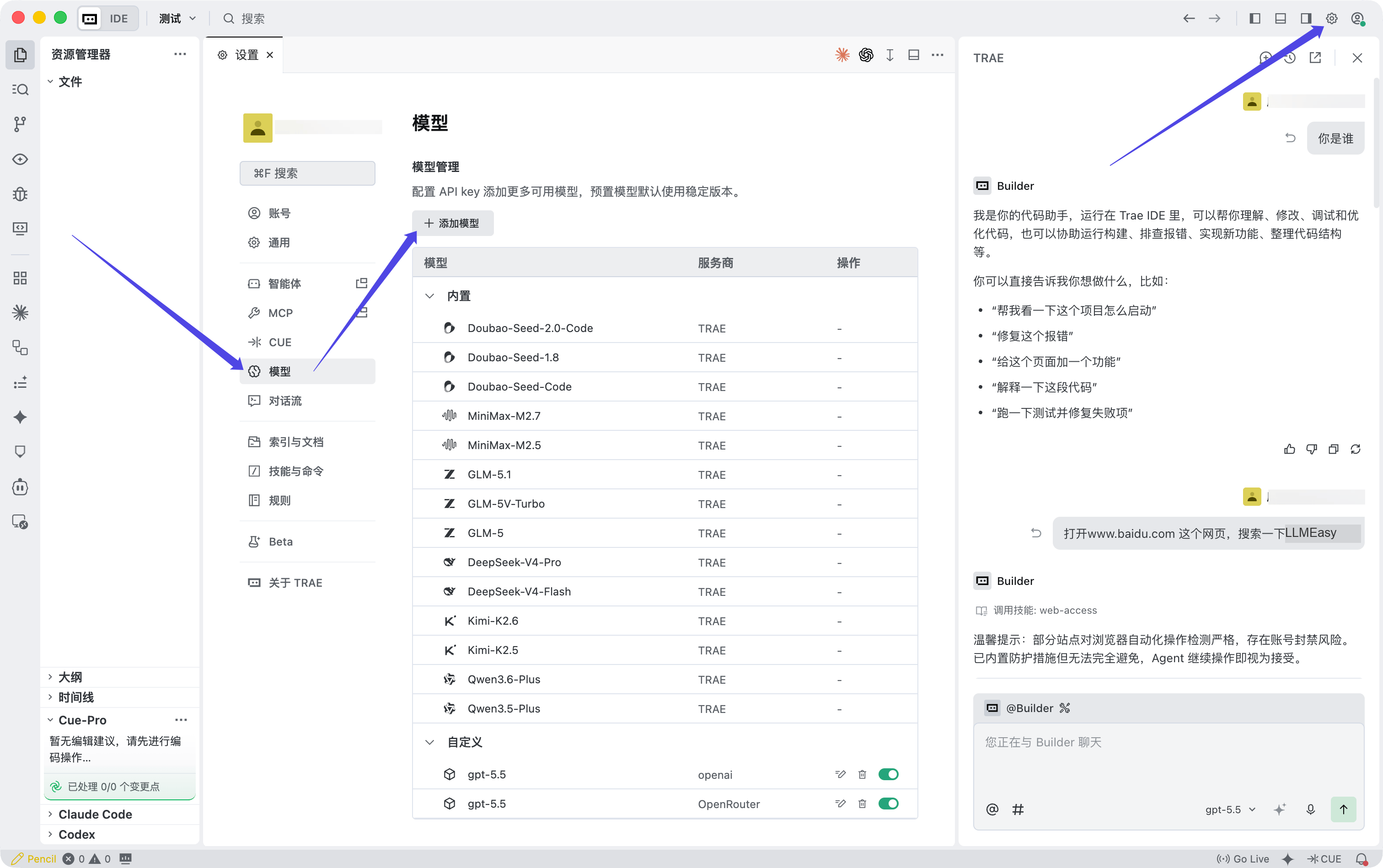
**IDE** mode에서 오른쪽 위의 **Settings** icon을 클릭하여 settings center를 여세요.
**SOLO** mode를 열고 chat panel 오른쪽 위의 **Settings** icon을 클릭할 수도 있습니다.
왼쪽 navigation에서 **Model**을 선택하여 **Model** panel을 여세요.
**+ Add model**을 클릭하세요.
 **Add model** window가 표시되면 fields를 다음과 같이 입력하세요.
| 필드 | 값 |
| ------------------ | -------------------------------------------------------------------------------------- |
| Provider | `OpenAI` |
| Model | `Custom model` |
| Model ID | 모델 광장에서 복사한 **지원되는 provider의 model ID** |
| API key | BetterToken console에서 복사한 API Key |
| Custom request URL | `https://www.bettertoken.ai/v1/chat/completions` |
**Add model** window가 표시되면 fields를 다음과 같이 입력하세요.
| 필드 | 값 |
| ------------------ | -------------------------------------------------------------------------------------- |
| Provider | `OpenAI` |
| Model | `Custom model` |
| Model ID | 모델 광장에서 복사한 **지원되는 provider의 model ID** |
| API key | BetterToken console에서 복사한 API Key |
| Custom request URL | `https://www.bettertoken.ai/v1/chat/completions` |
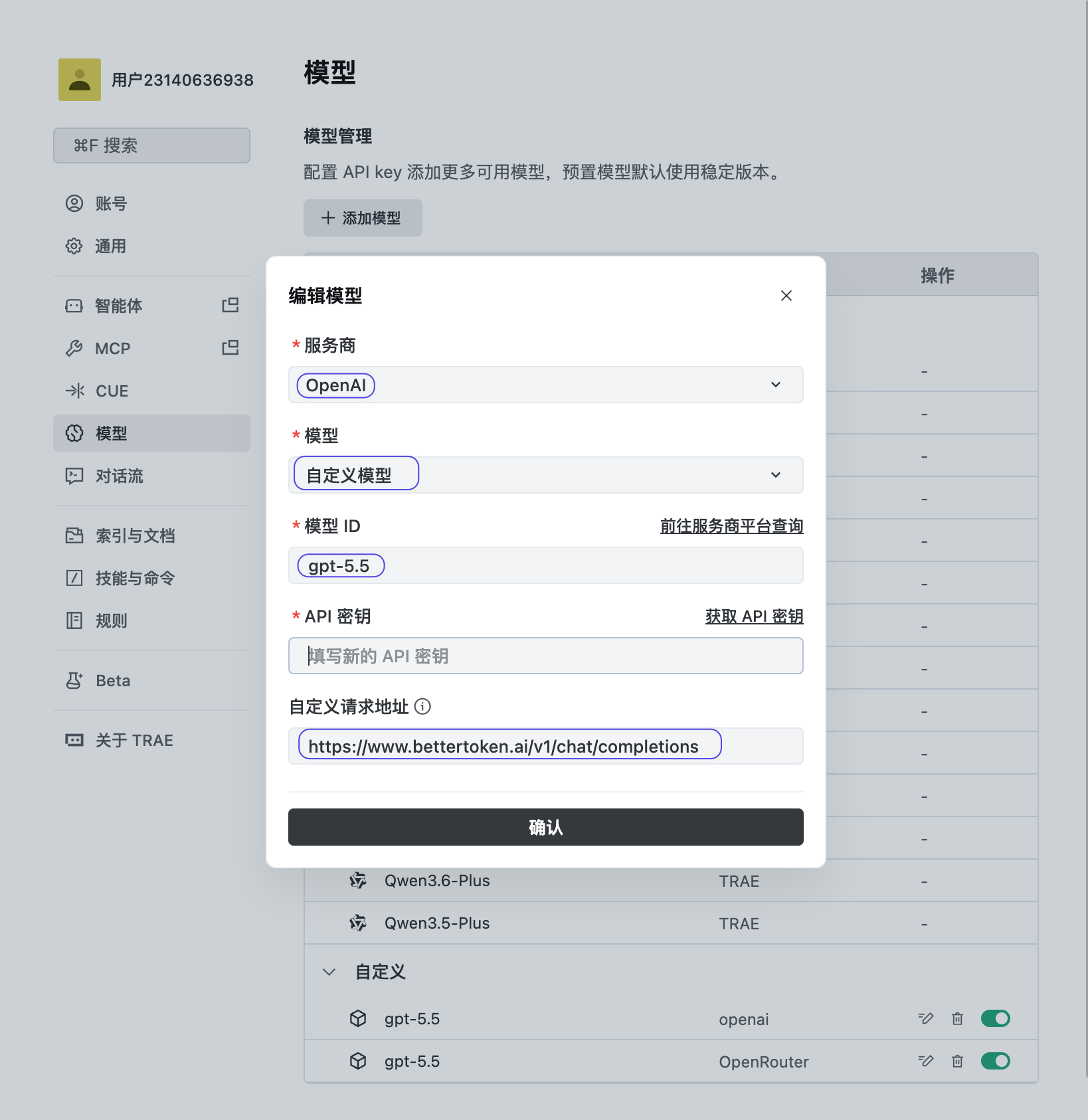 **Confirm**을 클릭하여 configuration을 저장한 다음 지원되는 provider의 새 모델을 선택하세요.
BetterToken은 **지원되는 provider의 models**를 통해서만 TRAE를 지원합니다. 고정된 Claude model names를 사용하지 말고 custom request URL을 `https://www.bettertoken.ai/v1`로 설정하지 마세요.
## 연결 확인
짧은 테스트 prompt를 보내세요. 도구가 authentication 또는 Model ID 오류 없이 response를 반환하면 연결이 작동합니다. configuration을 변경한 후에는 도구를 완전히 다시 시작하세요.
## 모델 전환
model selector를 열거나 configuration의 `Model` field를 변경하세요. 모델 광장의 정확한 Model ID를 사용한 다음 현재 session을 다시 시작하세요.
## 일반적인 오류
| 오류 | 확인할 사항 |
| ----------------------- | ------------------------------------------------ |
| `401` 또는 `Unauthorized` | BetterToken API Key를 확인하고 앞뒤 spaces를 제거하세요. |
| `404` | Base URL을 확인하고 specific endpoint path를 추가하지 마세요. |
| `model not found` | 모델 광장에서 현재 Model ID를 복사하세요. |
| Changes가 적용되지 않음 | configuration을 저장하고 도구를 완전히 다시 시작하세요. |
* [OpenAI-compatible API와 Anthropic-compatible API 비교](/ko/faq/concepts/openai-compatible-vs-anthropic-compatible)
* [MCP와 API Key 및 Base URL 비교](/ko/faq/concepts/mcp-vs-api-key-base-url)
* [model\_provider, base\_url 및 wire\_api란 무엇인가요?](/ko/faq/codex/model-provider-base-url-wire-api)
* [Cline에서 OpenAI-compatible API 구성](/ko/faq/cline/openai-compatible-api)
## 고급 설정
### 지원 Provider
| Provider | 상태 |
| -------- | ------- |
| Claude | 지원되지 않음 |
| GPT | 수동 설정 |
| Kimi | 수동 설정 |
| GLM | 수동 설정 |
표시된 상태는 이 페이지에서 설명하는 BetterToken 설정 방식에 적용됩니다.
* **수동 설정**: API Key, Base URL, Model을 입력하세요.
* **지원되지 않음**: 검증된 직접 연결 방식이 아직 없습니다.
## 기술 세부 정보
TRAE에는 Base URL만이 아니라 전체 custom request URL `https://www.bettertoken.ai/v1/chat/completions`이 필요합니다.
**Confirm**을 클릭하여 configuration을 저장한 다음 지원되는 provider의 새 모델을 선택하세요.
BetterToken은 **지원되는 provider의 models**를 통해서만 TRAE를 지원합니다. 고정된 Claude model names를 사용하지 말고 custom request URL을 `https://www.bettertoken.ai/v1`로 설정하지 마세요.
## 연결 확인
짧은 테스트 prompt를 보내세요. 도구가 authentication 또는 Model ID 오류 없이 response를 반환하면 연결이 작동합니다. configuration을 변경한 후에는 도구를 완전히 다시 시작하세요.
## 모델 전환
model selector를 열거나 configuration의 `Model` field를 변경하세요. 모델 광장의 정확한 Model ID를 사용한 다음 현재 session을 다시 시작하세요.
## 일반적인 오류
| 오류 | 확인할 사항 |
| ----------------------- | ------------------------------------------------ |
| `401` 또는 `Unauthorized` | BetterToken API Key를 확인하고 앞뒤 spaces를 제거하세요. |
| `404` | Base URL을 확인하고 specific endpoint path를 추가하지 마세요. |
| `model not found` | 모델 광장에서 현재 Model ID를 복사하세요. |
| Changes가 적용되지 않음 | configuration을 저장하고 도구를 완전히 다시 시작하세요. |
* [OpenAI-compatible API와 Anthropic-compatible API 비교](/ko/faq/concepts/openai-compatible-vs-anthropic-compatible)
* [MCP와 API Key 및 Base URL 비교](/ko/faq/concepts/mcp-vs-api-key-base-url)
* [model\_provider, base\_url 및 wire\_api란 무엇인가요?](/ko/faq/codex/model-provider-base-url-wire-api)
* [Cline에서 OpenAI-compatible API 구성](/ko/faq/cline/openai-compatible-api)
## 고급 설정
### 지원 Provider
| Provider | 상태 |
| -------- | ------- |
| Claude | 지원되지 않음 |
| GPT | 수동 설정 |
| Kimi | 수동 설정 |
| GLM | 수동 설정 |
표시된 상태는 이 페이지에서 설명하는 BetterToken 설정 방식에 적용됩니다.
* **수동 설정**: API Key, Base URL, Model을 입력하세요.
* **지원되지 않음**: 검증된 직접 연결 방식이 아직 없습니다.
## 기술 세부 정보
TRAE에는 Base URL만이 아니라 전체 custom request URL `https://www.bettertoken.ai/v1/chat/completions`이 필요합니다.